
Benefits of SMS Voting
SMS voting is our second most popular option with voters because it is quick and easy. Voters can send their voting preference to a mobile number, then get a reply text to confirm that their vote is lodged. Our mobile phone voting service is automated and optimised for voters in Australia.

Authenticated
Voter authentication helps to minimise fraud and maximise trust in the result. Learn more
Secret
The SMS voting process is automated so voter preferences remain anonymous. Learn more
Flexible
Voters can lodge their vote anywhere they have mobile reception, at anytime during the ballot.
SMS Communications
We can also send voting information by text, so all voters need to do is reply to our message to vote.
Accurate
Votes are automatically counted in real time. System rules prevent invalid or multiple votes.
Receipt by SMS
Once the vote has been successfully submitted a receipt SMS is sent back to the voter.
Cost effective
There are no expensive postage, material or handling costs associated with SMS voting.
Easy to use
Voting only takes a minute using our mobile phone voting service.
How SMS Voting Works
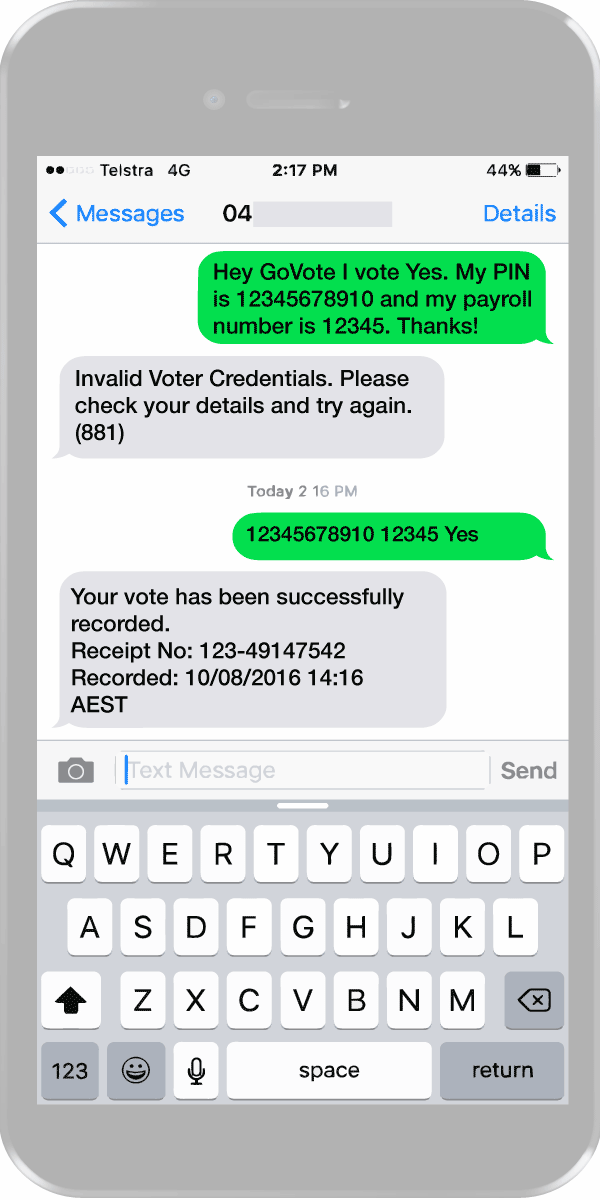
Mobile Phone Voting works best for one question ballots, like a vote on an enterprise agreement. The process is completely automated. To lodge an SMS vote, voters must send a text message in a specific format to a dedicated mobile number.
SMS Voting Key Points
How to Vote
The SMS voting channel doesn’t have detailed voting instructions built in. GoVote can send voting information by one or a combination of email, SMS or post. Generic instructions are also available online.
Authentication Details
Voters will need their GoVote PIN number to vote. This is included in the voting instructions that we send. Combining SMS communications and SMS voting is a great option for voters without email.
SMS Format
Voting instructions will guide voters on the required text message format. It’s important that people stick to it. If unsuccessful a text message is sent back to the voter with details of the error.
That’s it!
Simplicity on the outside, expert software on the inside. We work to make the SMS voting process as simple as possible without compromising on the fundamentals of security and anonymity.
Voting you can count on
GoVote is Australia’s industry leader in the planning, management and delivery of secure, independent ballots and elections. We work across all industries with organisations big and small, public and private, including some of Australia’s most recognisable names. Our voting services can save you time and resources, and ensure your vote is conducted to meet any governance requirement.


Organise a Vote with SMS Voting
Get a detailed plan, obligation free, for your upcoming vote.